Best AI Dictation Apps of 2025: Typing is no longer the fastest way to write.
In 2025, AI-powered dictation apps have quietly become one of the most useful productivity tools — not just for writers, but for students, developers, professionals, and even casual users who are tired of keyboards.
Earlier dictation software struggled with accents, pauses, and real-world speech. Today, modern AI models understand context, intent, and even writing tone. You can speak naturally, make mistakes, change your mind mid-sentence — and still get clean, usable text.
This article is not a copied list.
Each tool below is selected based on real usability, privacy approach, pricing logic, and practical value — not hype.
What Makes AI Dictation Apps Different in 2025?
Before jumping into the list, it’s important to understand why dictation apps feel so much better now.
Modern AI dictation tools use:
- Large language models to understand context
- Advanced speech-to-text engines trained on diverse accents
- Post-processing AI that removes filler words and fixes grammar automatically
In simple words:
You speak like a human, the app writes like an editor.
Wispr Flow – Best for Custom Writing Styles
Wispr Flow is built for people who write in different tones throughout the day — emails, chats, work documents, or even code comments.
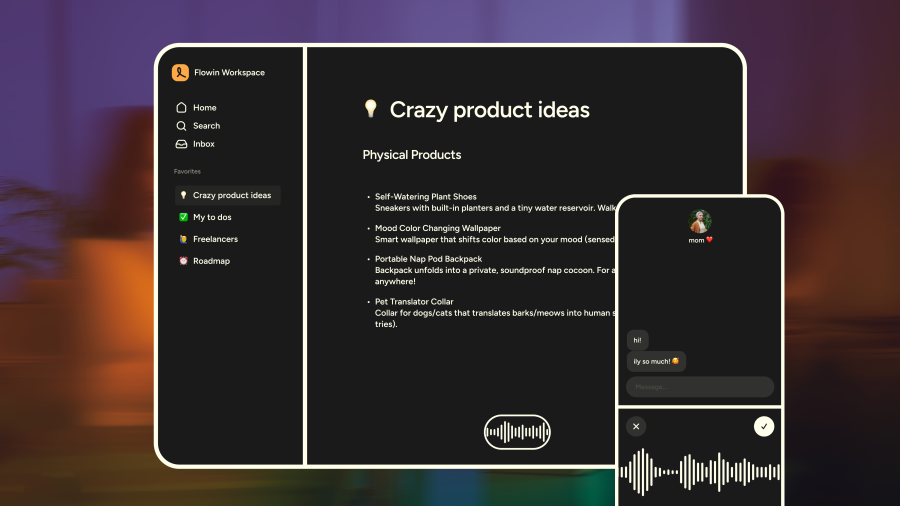
What makes it stand out is its style control. You can tell the app whether you want your text to sound formal, casual, or very relaxed. This sounds small, but it saves a surprising amount of editing time.
Best for
- Professionals
- Remote workers
- People who switch between personal and work writing
Limitations
- Free tier word limit is modest
- Subscription pricing is on the higher side
Willow – AI Dictation With Strong Privacy Focus
Willow takes a different approach. Instead of sending everything to the cloud, it stores transcripts locally and allows users to opt out of model training.
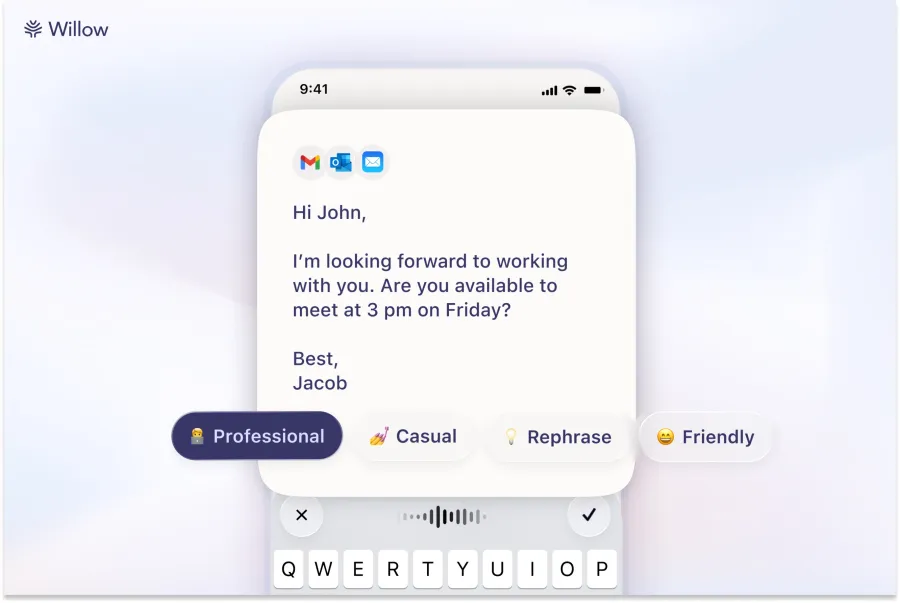
Its standout feature is idea expansion — you can say a few words, and Willow can generate a full paragraph based on your intent. This is especially useful for journaling, brainstorming, or drafting notes.
Best for
- Privacy-conscious users
- Writers who think faster than they type
Limitations
- Advanced features are locked behind subscription
- Less control over output structure
Monologue – Offline AI Dictation for Maximum Control
Monologue is designed for users who want full ownership of their data. You can download the model and run everything on your own device.
Another interesting feature is tone customization depending on the app you’re using. Your writing can sound different in a chat app versus a document editor — automatically.
Best for
- Developers
- Security-focused users
- Offline workflows
Limitations
- Requires a reasonably powerful system
- Interface is more functional than polished
Superwhisper – Flexible Models and Advanced Controls
Superwhisper is for users who want control over AI models. You can choose different speech recognition models based on speed or accuracy, including local and cloud options.
It also supports transcription from audio and video files, making it useful beyond live dictation.
Best for
- Power users
- Content creators
- Multilingual transcription needs
Limitations
- Interface may feel complex for beginners
- Advanced features need paid plans
VoiceTypr – One-Time Payment, No Subscription
VoiceTypr is refreshing in a world full of subscriptions. It follows an offline-first approach and offers lifetime licenses instead of monthly fees.
It supports a large number of languages and also provides an open-source version for users who want full transparency.
Best for
- Budget-conscious users
- Long-term users who hate subscriptions
Limitations
- UI is minimal
- Fewer AI editing features compared to premium tools
Aqua – Fastest Dictation With Smart Autofill
Aqua focuses heavily on speed and latency. The text appears almost instantly as you speak, which makes it feel natural during continuous writing.
Its autofill feature is surprisingly practical. You can speak shortcuts like “my address” or “company intro,” and the app inserts predefined text.
Best for
- Professionals
- Repetitive typing tasks
- Fast-paced workflows
Limitations
- Smaller ecosystem
- Advanced features require paid plans
Handy – Simple, Free, and Open Source
Handy is for people who want something basic, free, and reliable. It doesn’t try to be smart — it just converts speech to text.
There’s no heavy AI editing, but for simple dictation tasks, it works well.
Best for
- Beginners
- Linux users
- No-cost setups
Limitations
- No advanced formatting or tone control
- Very limited customization
Typeless – High Free Limits With Clean Output
Typeless offers one of the most generous free tiers among AI dictation apps. It also suggests sentence improvements when it detects unclear speech.
The company claims it doesn’t store or train on user data, which adds an extra layer of trust.
Best for
- Students
- Daily heavy users
- Clean, polished output
Limitations
- Desktop only
- Some features still evolving
How to Choose the Right AI Dictation App
Instead of asking “which is best,” ask:
- Do I need privacy or cloud convenience?
- Do I want editing help or raw transcription?
- Am I okay with monthly payments, or do I prefer one-time licenses?
There is no single winner — only the best fit for your workflow.
Final Thoughts: Are AI Dictation Apps Worth It?
In 2025, AI dictation is no longer a gimmick.
For many users, it’s faster than typing, easier on the body, and more natural for thinking.
If you write daily — emails, notes, blogs, or code comments — voice-to-text AI can easily save hours every week.
And the best part?
Most of these tools let you test them for free.

With years of experience in career guidance and skill development, Kapil shares practical insights on AIToolClouds.com, a platform designed to empower professionals, students, and freelancers with valuable knowledge.