CapCut vs Filmora: Most comparisons you find online repeat the same safe arguments:
“CapCut is free,” “Filmora is professional,” “CapCut is for TikTok,” etc.
None of those helped me when I actually needed to decide which editor to commit to. So instead of rewriting what others already say, this review is based entirely on my own experience using both CapCut and Filmora on PC — and using the paid versions, not free trials.
If you’re stuck between the two, especially in 2025, this breakdown will help you make a practical decision based on how these tools actually behave during real editing — not how they look on paper.
1. Why I’m Writing This Review
This isn’t sponsored, and I’m not recommending a “winner” just to please search traffic.
I’ve used both software for different types of projects. CapCut first felt like a shortcut — free, fast, familiar. Filmora felt more structured, almost like a stepping stone between beginner editing and full professional workflows.
This comparison is for someone trying to choose based on real use, not marketing.
2. My Editing Style & Requirements
I mostly create:
- Short-form content (YouTube Shorts, Instagram Reels, TikTok)
- Medium-length YouTube videos
- Simple product promos
- Occasional masked edits and animation
My priorities when editing:
- Keyframing
- Masking
- Good transitions & motion effects
- Export freedom
- A workflow that doesn’t interrupt creativity
I’m using a mid-range PC, not a high-end studio system — so performance matters.
3. First Impressions & Learning Curve
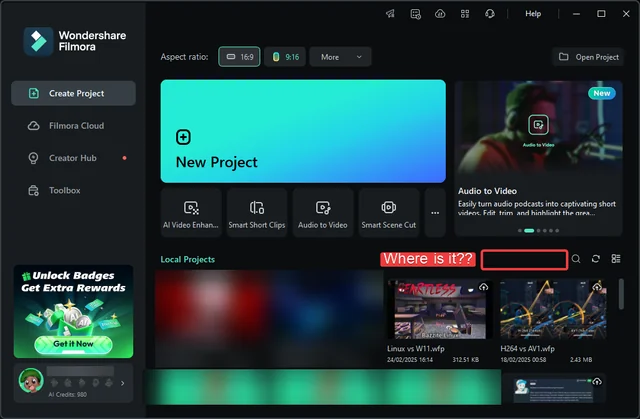
Filmora instantly feels like a traditional video editor. Multiple menus, effects panel, logic-driven layout — the kind of structure someone coming from Premiere Pro or Vegas would appreciate.
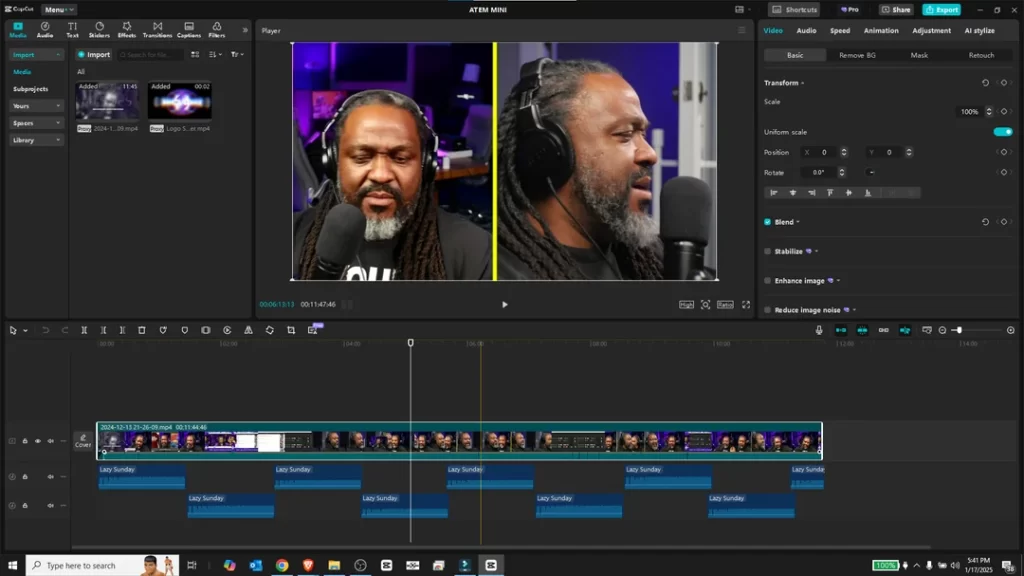
CapCut feels extremely lightweight and social-media oriented. The interface is simple, minimal, and honestly… fast. If your goal is speed over precision, CapCut immediately feels natural.
In a sentence:
Filmora feels intentional. CapCut feels effortless.
4. Editing Workflow Comparison
Cutting, trimming, timing — these things matter more than flashy effects.
- Filmora feels stable and controlled. Every movement has a sense of precision. Keyframing scales well if you’re doing long clips or animation-heavy projects.
- CapCut feels like it was designed for people who edit fast. CapCut lets you experiment without thinking, especially for short edits.
If you’re editing short content daily, CapCut flows better.
If you’re doing full videos or complex sequences, Filmora feels more reliable.
5. Effects, Libraries & Creative Flexibility
This is where both tools clearly separate.
Filmora
- Better curated, professional effects
- Editable elements (especially once Boris FX enters the workflow)
- More control over shapes, motion, and refinement
CapCut
- Massive free library
- Trend-based animations
- Ready-made transitions and effects that don’t need tuning
- Much faster if you’re following trends or editing social content
But CapCut has one very limiting problem:
No proper shapes or advanced masking tools.
Sometimes a simple idea becomes impossible because the feature just isn’t there.
If you’re the kind of editor who wants to customize everything, Filmora wins.
If you’re the kind who wants results fast, CapCut wins.
6. Exporting, Watermarks & Output Quality
A major difference:
- Filmora: Free version exports with watermark.
- CapCut: Free export with no watermark.
If you’re a beginner, this alone makes CapCut feel like a better deal.
However, when it comes to encoding settings, Filmora offers more control — especially for long-form content. CapCut prioritizes social platforms.
7. Price vs Value (Long-Term Reality)
This part matters more than most people realize.
Filmora offers a lifetime license, meaning once you pay, you’re done. If you plan to edit for years, Filmora becomes cheaper over time.
CapCut doesn’t offer lifetime payment — only monthly or yearly subscriptions. Right now CapCut feels “free,” but the moment TikTok transitions the product into a full monetized editor, the pricing changes everything.
So:
- Short-term budget? CapCut wins.
- Long-term investment? Filmora wins.
8. Performance & Stability
On the same PC:
- Filmora feels more resource-heavy at times, especially during complex multi-layer edits, but it remains stable.
- CapCut feels light but occasionally shows unexpected glitches in preview playback when projects get too layered.
Neither crashed often, but Filmora felt more predictable during longer edits.
Read Also: GPT-5.1 vs Gemini 3: I Compared Both for 48 Hours – Here’s What I Found
9. Hidden Frustrations You Only Notice After Weeks
Filmora’s biggest annoyance:
Keyframing locked in free mode makes the free version almost unusable for actual editing.
CapCut’s biggest annoyance:
No shape tools and a weak asset search system — finding effects sometimes takes longer than applying them.
Both tools limit creativity — just at different points.
10. Who Should Use Which? (Based on Type of Creator)
Editor Type | Best Choice | Reason |
|---|---|---|
Beginner or someone testing editing | CapCut | No watermark exports |
Short form creators | CapCut | Trend-based tools and fast workflow |
Semi-pro or long-term creator | Filmora | More control and lifetime option |
YouTube long-video editor | Filmora | Stable keyframing + pro plugins |
Fast workflow, low effort | CapCut | Minimal friction |
11. My Final Verdict After Using Both
If my work today only involved making reels, TikTok edits, or fast trending content, I’d choose CapCut without hesitation. It’s free, fast, and doesn’t slow down creativity.
But if I needed a tool for long-term editing growth, where I want more control, detailed edits, and something close to professional — Filmora makes more sense.
So the real answer isn’t which software is “better.”
It’s this:
CapCut is better for now.
Filmora is better if you care about where your editing skills will be in the future.
Both are useful — but for very different types of creators.

With years of experience in career guidance and skill development, Kapil shares practical insights on AIToolClouds.com, a platform designed to empower professionals, students, and freelancers with valuable knowledge.