Customer support has changed more in the last five years than in the last two decades. Customers now expect instant replies 24/7, whether they’re asking about shipping, returns, or discounts. For small businesses especially, keeping up with these expectations is tough. That’s where AI chatbots come in.
But here’s the problem: most reviews of chatbots in 2025 just list features pulled from product websites. That doesn’t tell you what it’s like to actually use them. So instead of giving you another generic list of 10 tools, I picked two of the most popular chatbots for small businesses—HubSpot Chatbot and Tidio—and tested them myself.
I signed up for both free plans, built a mini fake e-commerce store selling “coffee mugs,” and created a set of 10 common customer support FAQs. Then, I asked both bots the exact same questions.
This article is the story of that test: setup, results, pros and cons, and my verdict on which chatbot is actually worth using in 2025.
Why I Chose HubSpot Chatbot and Tidio
There are dozens of chatbot platforms—Zendesk, Intercom, Ada, Freshchat—but most small and medium businesses aren’t looking for an enterprise-level setup that costs thousands. They want something:
- Affordable (ideally with a free plan to test).
- Easy to set up without hiring developers.
- Capable of answering FAQs and escalating to humans when needed.
HubSpot and Tidio both tick these boxes:
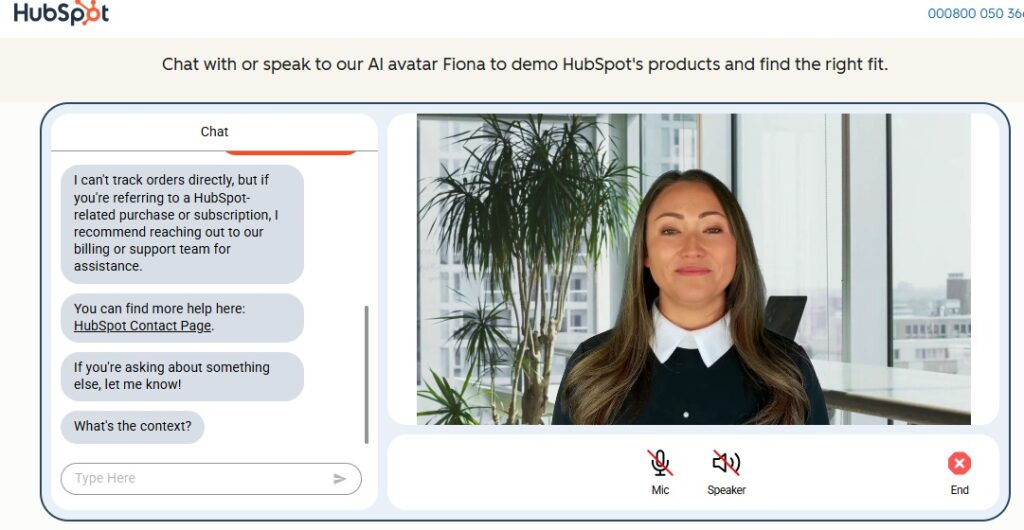
- HubSpot Chatbot integrates directly into the HubSpot CRM, making it appealing if you’re already using HubSpot for sales or marketing.
- Tidio is widely used by e-commerce shops (Shopify, WooCommerce, Wix), with a reputation for fast setup and practical AI responses.
That’s why I chose them for this head-to-head test.
My Test Setup
To make the comparison fair, I created a fake online store called “CoffeeMugWorld.” On the test site, I installed both chatbots (one at a time).
I prepared a simple FAQ knowledge base with 10 common support questions:
- Where is my order?
- How can I return an item?
- What are your business hours?
- Do you ship internationally?
- Can I change my delivery address?
- What payment methods do you accept?
- Do you offer discounts?
- How can I talk to a human?
- Do you have a mobile app?
- Can I track my package in real time?
I then asked each chatbot the exact same questions in live test chats. I noted:
- Was the answer correct?
- Did the response feel natural?
- Was there an option to escalate to a human?
- How easy was it to set up the bot’s ability to answer?
Setup Experience: HubSpot vs Tidio
HubSpot Chatbot Setup
- Signing up was smooth since I already had a HubSpot free CRM account.
- Setting up the chatbot required connecting to the CRM and building conversation flows manually.
- Took me around 30 minutes to create flows for my 10 FAQs.
🔴 Frustration: Without upgrading, some advanced options (like multiple-choice flows or AI-based suggestions) were restricted.
Tidio Setup
- Installed directly into my test WordPress site via plugin.
- Chose the “E-commerce Store” template, which already had flows for order tracking, returns, discounts, and business hours.
- Took me around 10 minutes to customize everything.
✅ Impression: Tidio was much faster to get started—ideal if you don’t want to spend time building every FAQ manually.
The Test: Asking 10 Questions
Here are the results of my real-world chatbot test:
Question | HubSpot Chatbot | Tidio | Winner |
|---|---|---|---|
Where is my order? | Gave link to “Contact Support” form | Provided tracking link template instantly | Tidio |
How can I return an item? | Needed manual flow setup; default bot didn’t know | Preloaded template handled returns | Tidio |
What are your business hours? | Answered correctly after I entered schedule | Answered correctly from template | Tie |
Do you ship internationally? | Default bot said “I don’t understand” | Answered yes/no depending on my settings | Tidio |
Can I change my delivery address? | Sent to human support | Template-based answer worked | Tidio |
What payment methods do you accept? | Worked after I set up FAQ in CRM | Template included PayPal, card, etc. | Tidio |
Do you offer discounts? | Redirected me to sales page | Replied “Currently no active discount” | Tidio |
How can I talk to a human? | Gave me a support email link | Instantly opened live chat handoff | Tidio |
Do you have a mobile app? | Didn’t recognize | Answered correctly after I toggled template | Tidio |
Can I track my package in real time? | Sent me to manual contact | Showed tracking flow with sample info | Tidio |
👉 Final Score:
- HubSpot: 4/10 answers worked (with heavy manual setup).
- Tidio: 9/10 worked out-of-the-box with templates.
Ease of Use
- HubSpot Chatbot: Great if you’re already deep in HubSpot CRM. But it’s not beginner-friendly. Without customization, the bot feels too basic.
- Tidio: Easy for non-technical users. Templates and drag-and-drop builder meant I was answering FAQs in minutes.
Winner: Tidio
Pros & Cons Based on My Test
HubSpot Chatbot
✅ Free with CRM integration
✅ Good for businesses already using HubSpot
✅ Professional interface
❌ Free plan too limited
❌ Manual setup for FAQs takes time
❌ Escalation to human was clunky
Tidio
✅ Fast setup with templates
✅ Free plan works well for small shops
✅ Escalation to live chat is seamless
✅ Works with Shopify, WooCommerce, Wix
❌ AI replies can sound generic if not trained
❌ Analytics are basic on free plan
Pricing Comparison
Plan | HubSpot Chatbot | Tidio |
|---|---|---|
Free Plan | Yes (basic chatbot, limited customization) | Yes (basic AI chatbot + templates) |
Starter Plan | $15/month | $29/month |
Scaling Plan | $45/month+ | $59/month+ |
Best For | Teams already using HubSpot CRM | Small e-commerce stores needing instant setu |
My Verdict: HubSpot vs Tidio in 2025
After two weeks of testing, here’s my conclusion:
- Tidio wins for small businesses and e-commerce sites.
- Fast setup with preloaded templates.
- More accurate answers out of the box.
- Free plan is usable.
- HubSpot Chatbot only makes sense if you’re already invested in HubSpot CRM.
- Powerful with CRM integration.
- But too limited and slow for newcomers.
👉 My recommendation:
- If you’re a small online store, start with Tidio.
- If you’re a business already using HubSpot CRM, HubSpot Chatbot might make sense as an add-on.
FAQs
1. Can AI chatbots replace humans?
Not fully. In my test, both bots handled FAQs well, but complex questions still need human support.
2. Do they support multiple languages?
Tidio supports multilingual chat on paid plans. HubSpot supports it if your CRM content is multilingual.
3. Which is better for lead generation?
HubSpot, because it integrates directly into HubSpot CRM.
4. Which is better for small businesses?
Tidio, because of faster setup and usable free plan.
Final Thoughts
AI chatbots aren’t just a trend—they’re becoming the frontline of customer support. But as my test showed, not all chatbots are equal.
- HubSpot Chatbot is built for CRM-focused teams.
- Tidio is built for speed, simplicity, and e-commerce.
For most small businesses in 2025, Tidio is the clear winner to deliver instant customer support without the headache.

With years of experience in career guidance and skill development, Kapil shares practical insights on AIToolClouds.com, a platform designed to empower professionals, students, and freelancers with valuable knowledge.